
💡 Key Takeaways
- Dashboard: Centralized interface for working with domain SEO reports.
- Overview Statistics: Quick quality analysis of reports with color indicators.
- Domain Grouping: Convenient organization of reports and projects by websites.
- Additional Tools: Integration with other ClikBy features for comprehensive analysis.
Introduction to ClikBy SEO Reports
SEO reports in ClikBy are a powerful tool for analyzing and optimizing your websites. The system allows you to create detailed reports on domain status, track changes over time and make informed decisions to improve SEO performance.
The main advantage of the system is checking any domain page. Now a detailed report can be obtained for any site page, not just the main one. You can regularly update reports to track changes in SEO metrics.
Dashboard Interface Structure
The SEO reports dashboard consists of several key sections, each performing a specific function in the process of analyzing and managing reports.
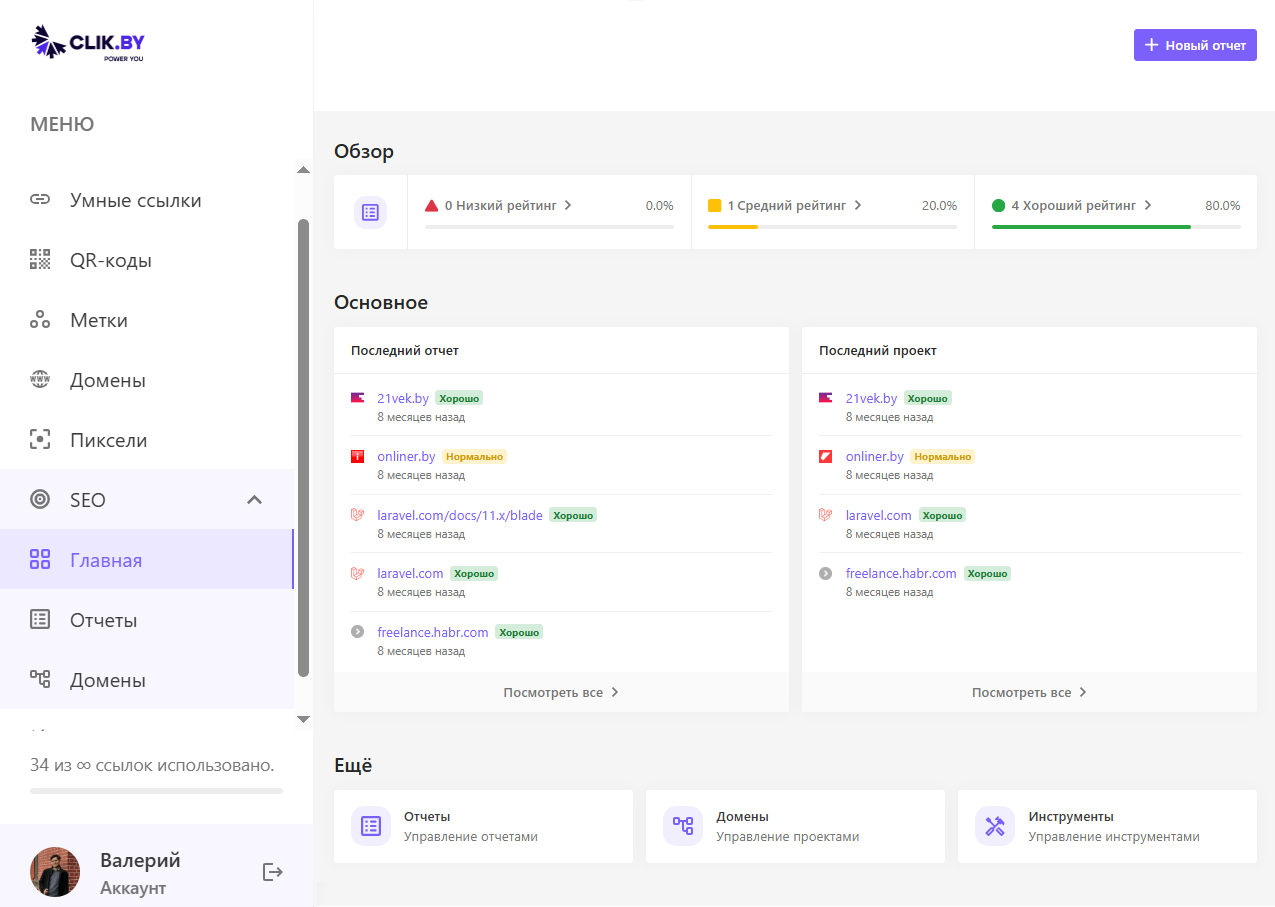
User Profile
Top interface block contains information about the current user and main actions:
- Avatar and username — shows who is currently working with the system
- User email — contact information for notifications
- "New Report" button — quick creation of new domain SEO analysis
Tip: The "New Report" button is your starting point for analyzing any new domain. Use it every time you need to check a site's SEO status.
"Overview" Section — Report Quality Statistics
This section provides quick analysis of all your reports using color indicators:
- 🔴 Bad reports (Low Rating) — domains with critical SEO issues requiring immediate attention
- ⚠️ Decent reports (Medium Rating) — sites with average performance, opportunities for improvement exist
- ✅ Good reports (High Rating) — domains with excellent SEO performance
Each indicator shows both the absolute number of reports and the percentage ratio of the total number of analyzed domains.
Main Content — "Latest Report" and "Latest Project"
The central part of the interface is divided into two columns for convenient navigation:
Latest Report
Shows recently created or updated SEO analyses with the following information:
- Domain icon — visual site identifier
- Domain name — full URL of the analyzed site
- Quality status — color label (Good/Decent)
- Creation date — when the last analysis was performed
Latest Project
Displays projects you're working on, with similar information structure. This helps quickly switch between active tasks.
Practical Application: Use these sections for quick access to recent work. If you see a domain with "Decent" status, it's a signal for more detailed analysis and optimization.
"More" Section — Additional Tools
The bottom block contains integrations with other ClikBy features:
- 📊 Reports — managing all SEO analysis reports
- 🌐 Domains — project management
- 🛠️ Tools — access to additional marketer utilities
How to Work with SEO Reports
Effective work with SEO reports requires understanding the process from creation to results analysis.
Creating New Report
To start domain analysis, follow these steps:
- Click "New Report" button at the top of the interface
- Enter domain URL for analysis
- Select analysis parameters (scan depth, check types)
- Launch the process and wait for completion
Processing Time: Depending on site size, report creation can take from several minutes to an hour. The system will notify you when the analysis is ready.
Analysis and Interpretation of Results
After creating the report, pay attention to the following aspects:
Color Indicators
- Green (Good) — site meets SEO standards, minimal improvements needed
- Orange (Decent) — opportunities for improvement exist, medium priority
- Red (Bad) — critical issues, require immediate solution
Work Prioritization
Recommended sequence for working with reports:
- First eliminate critical issues (red indicators)
- Then work on optimization of sites with orange labels
- Regularly monitor domains with good performance
Conclusion
ClikBy SEO reports provide a comprehensive tool for managing your domains' SEO health. The system helps to:
- Centrally manage all projects in one interface
- Quickly assess domain status thanks to color indicators
- Prioritize work based on issue criticality
- Track optimization progress over time
Recommendation: Regularly create reports for your key domains — this will help identify issues at an early stage and maintain high SEO performance.