
💡 Key Takeaways
- Creation Zone — quick link creation with basic and advanced settings.
- Links List — manage all created links with filtering and search.
- Advanced Settings — pixels, targeting, AI Selena and other smart features.
Your Traffic Control Center
Welcome to the heart of ClikBy — the "Links" section. If AI Selena is your brain, then this section is your hands. This is where you'll create, organize and manage every user flow.
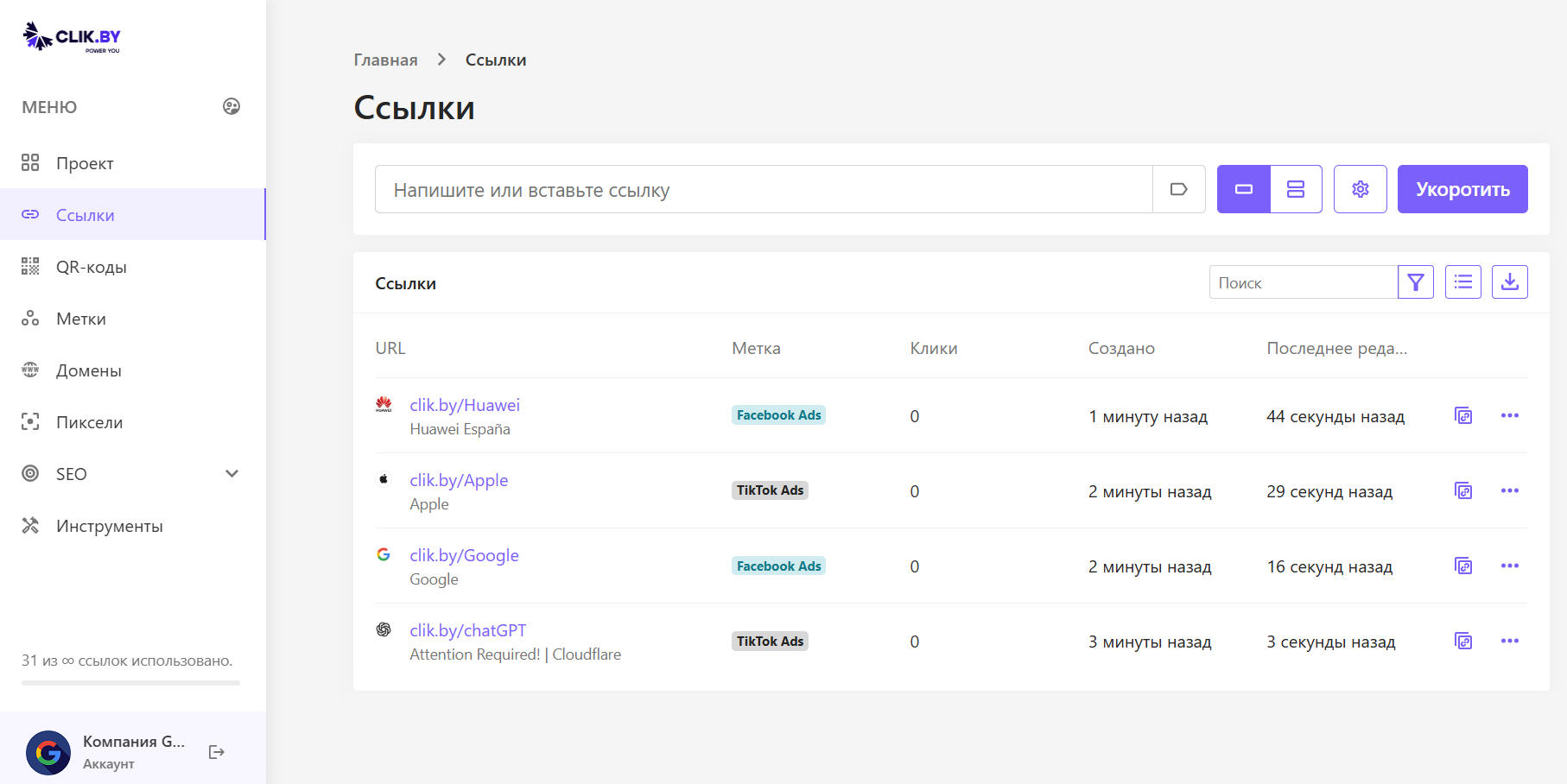
Let's break down this screen into two key zones: creation zone and your links list.
Creation Zone — Turning Long into Smart
At the top of the screen is a panel for creating a new link. This is your starting point.
Basic Tools
- Input field ("Write or paste link"): This is where you paste that long link you want to shorten and make smart. For example, https://yoursite.by/products/category/new-summer-collection-2025/item-123.
- "Shorten" button: The simplest action. Paste the link, click "Shorten" — and in a second it appears in the list below. Perfect for quick tasks.
Advanced Features
But the real power of ClikBy lies in the buttons between the input field and the "Shorten" button:
🏷️ UTM Icon (polygon)
This feature allows you to very quickly add the necessary UTM tags for your link.
📚 Bulk Creation Icon (stack of frames)
Saves hours of time. Allows you to upload a list of dozens or hundreds of links and shorten them all at once.
⚙️ Settings Icon (gear)
This is the most important tool. Before shortening a link, you can click here to open advanced settings:
- Add pixels to the link for retargeting
- Enable smart traffic filtering
- Enable traffic analysis using AI Selena
- Set up targeting by geolocation, device, language or link rotation
- Set link expiration date or protect it with a password
- Add a comment to the link
- Change link alias (text after domain: clik.by/PROMO1)
Links List — Your Traffic Library
Below is a table with all your created links. This is your library, where everything is organized and ready to work.
List Management Tools
- Search and Filter (funnel icon): When there are many links, you can easily find the one you need by name, label or date. The filter allows you to display, for example, only links from the "Facebook Ads" campaign.
- Export (download icon): You can export the list of links and their statistics as a report.
What the Columns Mean
- URL: Here you see not only the short link itself (for example, clik.by/Huawei), but also the destination page title ("Huawei España"). This helps you instantly understand where the link leads without clicking on it. You can also add your own comment to understand exactly where the link leads or what its purpose is!
- Label: One of the organizational tools. You can assign labels (tags) to links to group them by advertising campaigns. In the screenshot we see labels "Facebook Ads" and "TikTok Ads". This makes it easy to analyze the effectiveness of each channel separately.
- Clicks: Operational counter of clicks for each specific link.
- Created / Last edit: Shows when the link was created and when the last changes were made to it.
Link Actions
At the end of each row there are two icons:
- Copy icon: The most frequent action. One click — and the short link is already in the clipboard, ready to paste into an advertisement or post.
- Three dots (...): Opens the additional actions menu:
- Edit: Change destination URL, labels or other settings
- View statistics: Go to the page with detailed analytics for this specific link
- Duplicate: Create a copy of this link
- Share: Instantly send the link through different platforms
- Delete: Remove the link from our database
⚠️ Important Warning About Deletion
When you delete a link, the QR code that was created for it will stop working, as it led to this specific link. Deleted links cannot be restored! Be careful!
Conclusion
The "Smart Links" section is your main work area in ClikBy. It combines the simplicity of creating short links with powerful analytics, targeting and traffic management capabilities. By mastering this section, you'll be able to effectively manage all your marketing campaigns.