
💡 Key Takeaways
- Tags — a system for organizing links by groups and campaigns.
- Filtering — allows analyzing statistics for individual channels.
- Structure — turns chaos of hundreds of links into an organized system.
Your Tool for Perfect Organization
If you have more than one advertising campaign, you need this section. Tags (or labels) are like folders for your links. They help group hundreds of links by common features so you can easily analyze results and not get lost in data.
Why Is This Needed?
Imagine you're running ads on TikTok and Facebook. To understand which channel is more effective, you create tags TikTok Ads and Facebook Ads. You mark all TikTok links with the first tag, and Facebook links with the second. As a result, you can filter and view summary statistics for each channel separately.
Tag Usage Examples:
- By Channels: TikTok, Facebook, Instagram, Email
- By Campaigns: Black Friday, Summer Sale, New Year
- By Products: Course A, Course B, Consultations
- By Audience: B2B, B2C, Retargeting
What's Shown on Screen
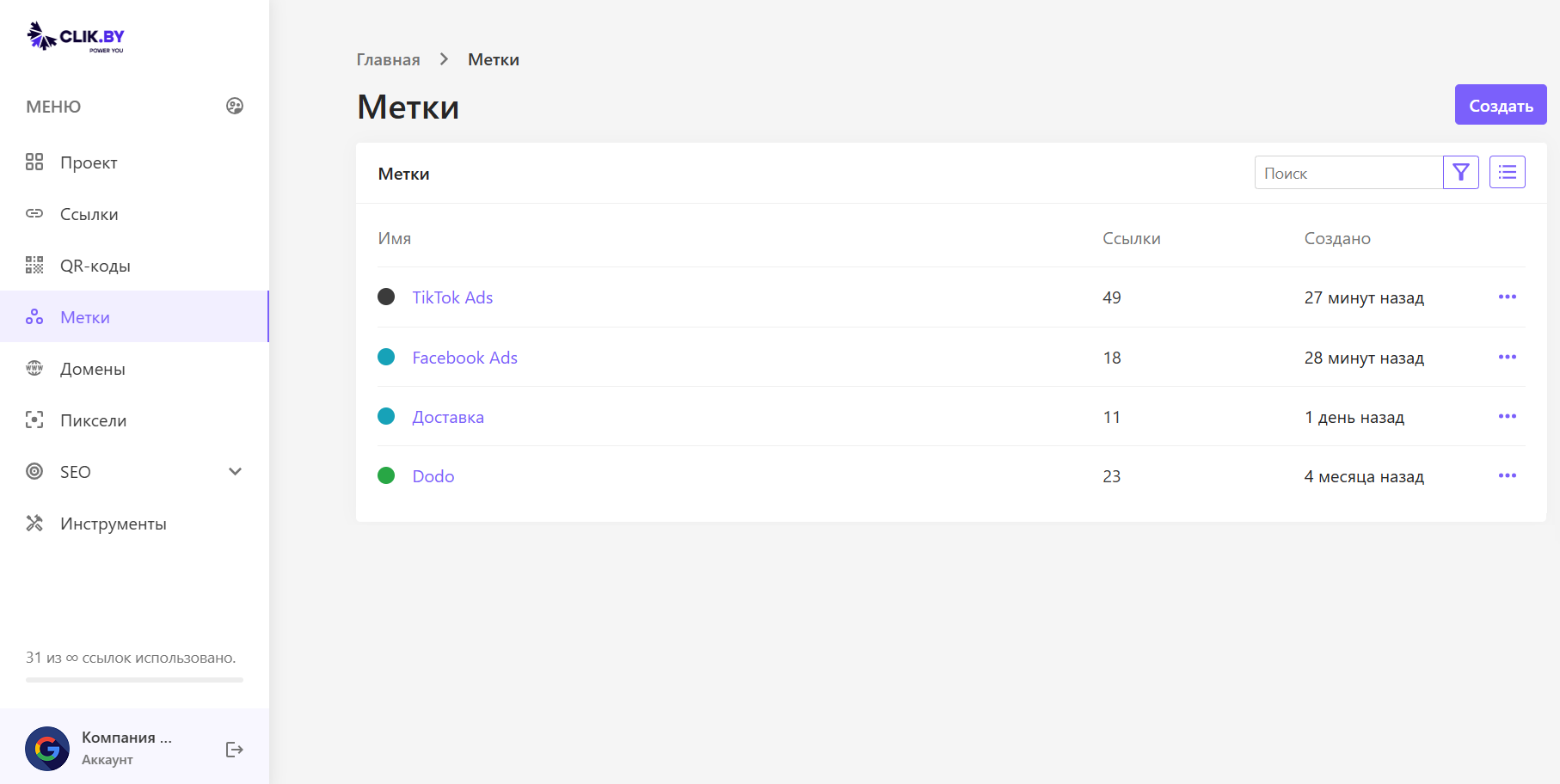
This is your list of created tags.
Interface Elements:
- Name: The name of your campaign, channel or group.
- Links: Key indicator. Shows how many links are already attached to this tag. For example, we see that the "TikTok Ads" campaign already has 49 links.
- Created: When the tag itself was created.
- Three dots (...): Menu for editing (change name/color) or deleting the tag.
How to Use This — Three Simple Steps
- Create a Tag: Click the "Create" button at the top right. Come up with a clear name (for example, "Black Friday Promotion") and choose a color for clarity.
- Assign Tag to Link: Now, when you create or edit any link, a field will appear where you can select one or more tags from the list.
- Filter and Analyze: Return to the "Links" section and use the filter to display only those links that relate to your "Black Friday Promotion" campaign.
Best Practices for Working with Tags
Naming Strategy
- Use clear names: "Email newsletter March", "Instagram Stories", "Facebook Retargeting"
- Be consistent: Choose a system and stick to it (for example, "Channel - Month - Type")
- Avoid duplication: Check if you've already created a similar tag
Organization by Levels
🎯 Level 1: Channels
Main traffic sources: Facebook, Google, TikTok, Email, SMS
📅 Level 2: Campaigns
Time-limited promotions: Black Friday, New Year, Summer Sale
🛍️ Level 3: Products
Specific goods or services: Course A, Consultation, Webinar
Color Coding (as an example)
- Blue: For social networks (Facebook, Instagram, TikTok)
- Green: For successful campaigns and promotions
- Orange: For test campaigns
- Red: For ineffective channels (requiring attention)
- Gray: For archived or completed campaigns
Analytics with Tags
- Compare channels: Which source gives the best CTR?
- Analyze by time: Which months are most effective?
- Evaluate products: Which products generate more clicks?
- Optimize budget: Where should you invest more funds?
Conclusion
Summary: Tags turn a chaotic list of links into a structured control panel for your marketing campaigns, saving your time and simplifying analysis.
Start by creating 3-5 main tags for traffic channels, then gradually add more specific categories as your campaigns grow.