
💡 Key Takeaways
- 5 minutes — time to create and set up TikTok pixel.
- Young audience — TikTok is ideal for targeting young audiences.
- Automatic optimization — TikTok algorithm finds the best audience itself.
- Simple integration — one code for all site events.
TikTok Pixel: Key to Young Audience
TikTok pixel is a code snippet installed on your site to track user actions after viewing ads on TikTok. It's a powerful tool for retargeting, conversion optimization and creating lookalike audiences among active TikTok users.
TikTok is especially effective for brands that want to reach young audiences (16-34 years) and use creative, viral advertising formats. The pixel helps measure the real effectiveness of such campaigns.
What TikTok Pixel Can Do:
- ✅ Tracks conversions and site actions
- ✅ Creates audiences for retargeting
- ✅ Optimizes impressions for target actions
- ✅ Builds lookalike audiences
- ✅ Measures advertising campaign ROI
- ✅ Works with TikTok machine learning algorithm
Creating TikTok Pixel
ℹ️ Important to Know
To create a TikTok pixel, you need a TikTok for Business advertising account. One account can have multiple pixels for different sites or projects.
Open TikTok Ads Manager
Go to ads.tiktok.com and log into your TikTok for Business advertising account.
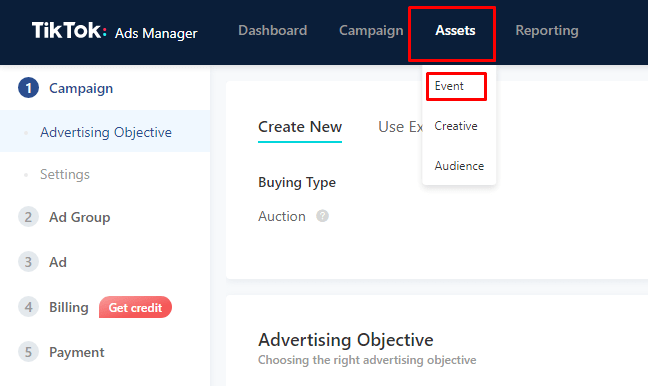
Go to Events Section
In the main menu find "Tools" → "Events" section. Click "Connect Data Source".
Create New Pixel
Select "Manual Setup", create a pixel and give it a name (for example, "My Site"). Copy the pixel ID.
Get Base Code
The system will generate the base pixel code. This code needs to be installed on all site pages for event tracking.
TikTok Pixel Example
Pixel ID: C9ABC123DEF456GH
This ID needs to be added to ClikBy settings for automatic tracking of all clicks on your smart links and site conversions.
Installing TikTok Pixel
1. Through TikTok Events Manager (manual installation)
Copy Base Code
In Events Manager copy the base pixel code that needs to be installed in the <head> section of the site.
Install Code on Site
Add the code to all site pages or use Google Tag Manager for centralized management.
Check Operation
Use TikTok Pixel Helper (Chrome extension) or "Test Events" function for verification.
2. How to Add TikTok Pixel to ClikBy
✅ Simple 1-Click Integration
On ClikBy service go to Pixels section and click "Add" button. Then enter a name for the pixel, select TikTok pixel from the list in the "Type" field, paste the pixel ID and click "Save".
TikTok Pixel Use Cases
Retargeting Young Audience
Bring back TikTok users who visited your site but didn't make a purchase. Especially effective for Gen Z.
Conversion Tracking
Measure real effectiveness of TikTok creative advertising: purchases, registrations, subscriptions.
Automatic Optimization
TikTok algorithm automatically finds users prone to conversion based on pixel data.
Behavior Analytics
Study how TikTok users behave on your site after viewing ads.
TikTok Pixel Event Setup
TikTok pixel supports standard events for tracking user actions:
Main TikTok Events
- ViewContent — product or content page view
- ClickButton — button click (CTA, "Buy", "Learn More")
- AddToCart — adding product to cart
- InitiateCheckout — starting checkout process
- AddPaymentInfo — adding payment information
- CompletePayment — completing purchase
- CompleteRegistration — site registration
- Subscribe — newsletter or service subscription
Automatic Setup via ClikBy
✅ Smart Tracking
ClikBy automatically sends ViewContent events when clicking smart links and can configure additional events based on user behavior.
⚠️ Important for Optimization
For effective TikTok algorithm performance, you need minimum 50 conversions per week. Start with broad events (ViewContent), then move to more specific ones.
Best Practices for Using TikTok Pixel
Setup and Testing
- Check operation: use TikTok Pixel Helper for Chrome
- Test events: ensure all key actions are tracked
- Learning period: give the algorithm 7-14 days for optimization
- Mobile optimization: most TikTok users use mobile devices
Creating Effective Campaigns
- Creative content: TikTok values authentic, entertaining content
- Fast loading: optimize landing page loading speed
- Mobile UX: adapt site for mobile devices
- Test audiences: compare effectiveness of different segments
Integration with ClikBy
- Simple installation: add pixel ID to ClikBy settings
- UTM tags: use parameters for source tracking
- A/B testing: test different landings and creatives
- Cross-platform analytics: compare with other channels
Compliance
- Privacy policy: notify about data collection
- Cookie consent: obtain user consent
- Age restrictions: consider TikTok audience specifics
- Content quality: follow TikTok advertising guidelines
Pro Tip: TikTok is especially effective for products and services targeting young audiences. Use trends, challenges and UGC content for maximum engagement.