




Key takeaways
- Branding: your own domains raise trust and recognition.
- Simplicity: connecting takes a few minutes.
- Professionalism: go.vashbrand.by/promo instead of clik.by/xyz.
Strengthen brand trust and recognition
Welcome to the «Domains» section. This feature turns short links from standard clik.by/xyz into a marketing asset like go.vashbrand.by/promo.
Why is this needed?
A short link with your domain instantly raises brand trust and recognition. Users click more often on a familiar company name.
Benefits of branded domains
- Higher CTR: people click familiar domains more often
- Trust: your own domain looks more professional
- Branding: every link strengthens recognition
- Memorability: branded links are easier to remember
- Safety: users are not afraid to follow familiar domains
What is shown on the screen?
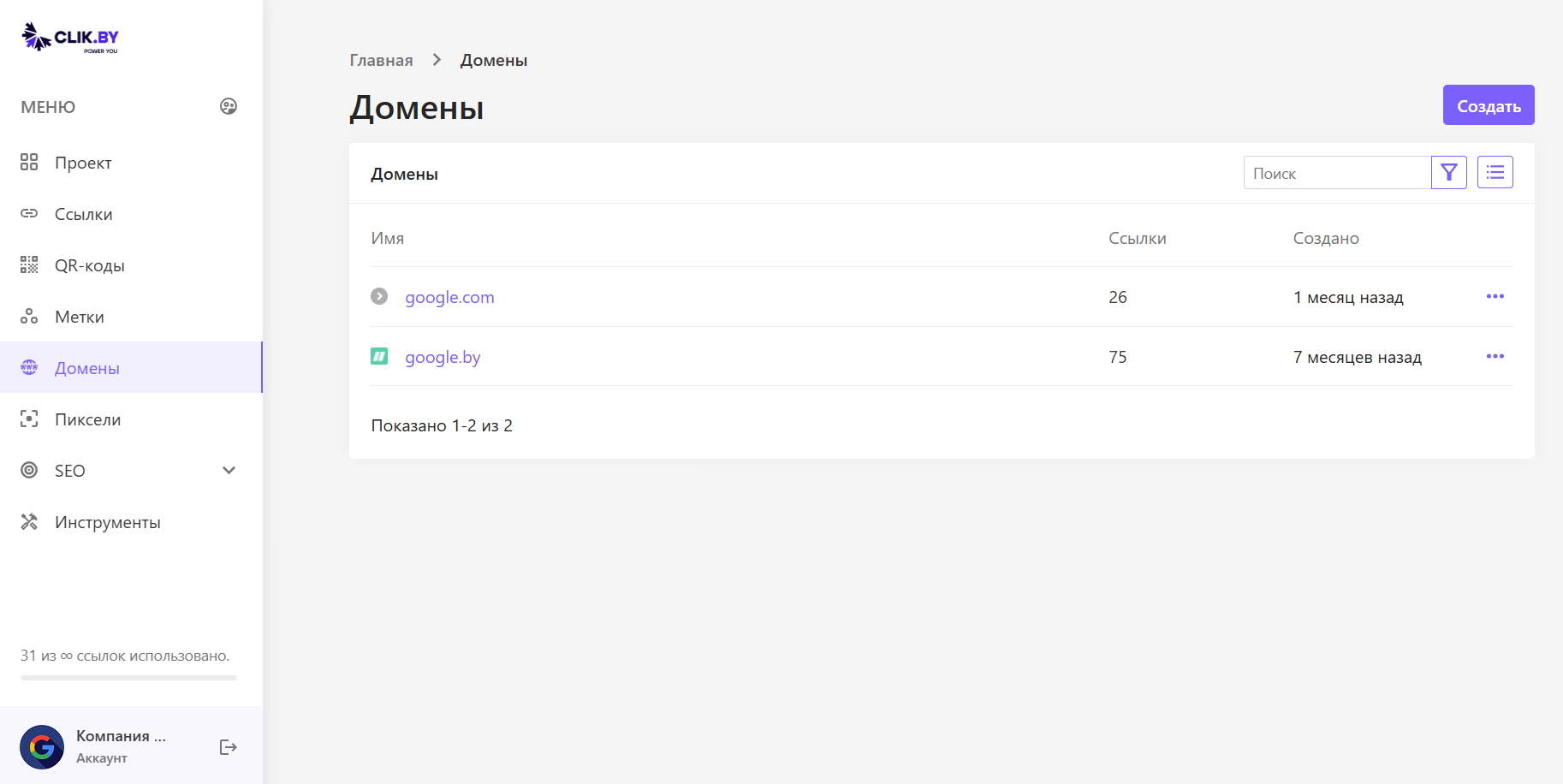
A list of domains already connected to the project for branded short links.
Interface elements
- «Create» button: start adding a domain — the system will give instructions for the registrar panel (a couple of minutes).
- Имя: the domain for shortening (for example, link.mycompany.by).
- Ссылки: how many smart links have already been created on this domain.
- Created: the date of connection to the platform.
- Ellipsis (…): management, going to smart links filtered by domain, deletion.
Domain connection process
Preparing the domain
A separate short domain, a subdomain of the main site, or a dedicated domain for links will work.
- Separate short domain: for example, mkomp.by
- Subdomain: for example, go.moyakompania.by
- Domain for links: for example, links.brand.com
Connection steps
Registering or choosing a domain
A short domain or a subdomain of the main site.
Connecting in ClikBy
Click «Create» and follow the instructions for one DNS record.
DNS setup
Add a CNAME that points the domain to ClikBy servers.
Verification
The system will check DNS and activate the domain automatically.
How does this work in practice?
Creating branded links
When creating a link, you choose clik.by or your own domain.
Clean URLs
Instead of clik.by/H8jK2 — mkomp.by/leto.
Conversion growth
Higher CTR thanks to recognition and trust.
Usage examples
- Email: go.brand.com/newsletter
- Social networks: promo.brand.com/summer2024
- Печать: info.brand.com/catalog
- QR codes: scan.brand.com/menu
Domain management
Функции
- Stats: the number of links on each domain
- Link search: quick jump to the domain's links
- Settings: changing parameters
- Deletion: disconnecting the domain (existing links keep working)
Monitoring
- Which domains are used more often
- CTR comparison of branded and standard links
- Thematic domains for different campaigns
Conclusion
Итог: the «Domains» section raises the professionalism of communications. Branded links are easier to remember, lift CTR, and strengthen the brand with every click.
Investing in your own domain pays off through higher trust and campaign conversion.