




Key takeaways
- Пиксели — a bridge between ClikBy and ad accounts.
- AI Selena filters traffic and passes only quality users.
- Result — ready audiences for retargeting.
The heart of your retargeting engine
The «Pixels» section is the engine of the marketing system. Here you connect links to Facebook, Google, TikTok, and other accounts so AI Selena can collect quality audiences.
What is a pixel in ClikBy?
It is an ID from the ad system. After you add it, ClikBy sends data on quality clicks into your ad Audience — the one you configure through AI Selena.
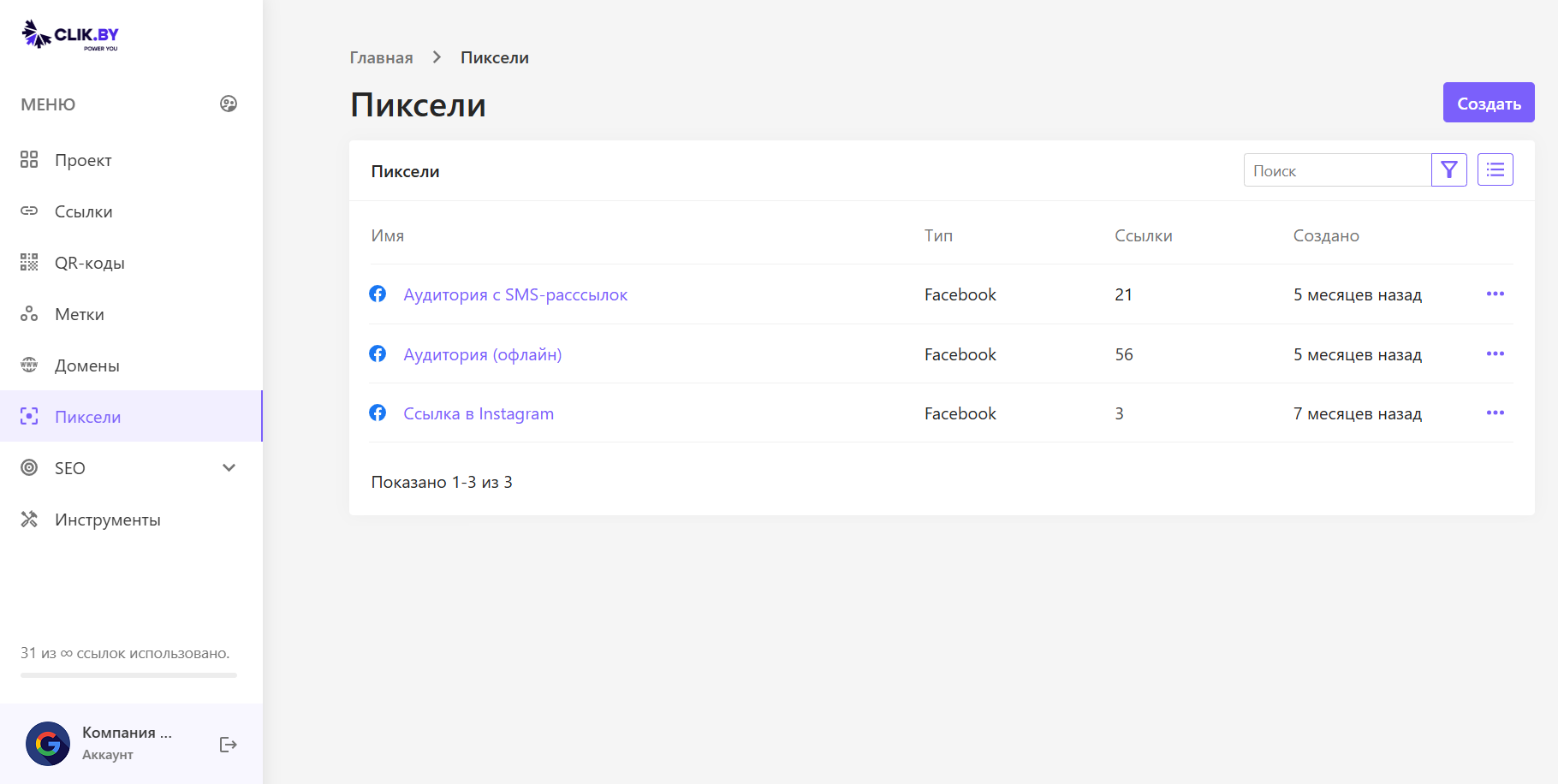
What is shown on the screen?
A list of pixels from ad accounts connected to ClikBy.
Interface elements
- «Create»: add a pixel — type (for example Facebook) and ID from the account.
- Имя: reflects the audience: «Audience from SMS», «Offline QR», «Instagram».
- Тип: ad system (Facebook, Google, TikTok…).
- Ссылки: on how many smart links the pixel is used.
- Ellipsis: edit or delete.
How pixels work
- Connection: pixel from the account → ClikBy
- Attachment: to smart links
- Сбор: users click
- Filtering: AI Selena selects quality
- Transfer: into the ad system
- Retargeting: a campaign on the collected audience
Practical example
Retargeting everyone who responded to the SMS mailing.
Full cycle
Copy the ID
From the Facebook ad account.
Add it in ClikBy
Type Facebook, name «Audience from SMS mailings».
Attach it to the link
In advanced settings (⚙️) check the pixel.
Send the SMS
Users follow the link.
AI Selena filters
Bots and accidental clicks are cut off.
The Audience fills
Quality users go into the ad account.
Launch the ads
Maximum conversion at minimum cost.
Supported platforms
- Facebook & Instagram: Meta Pixel
- Google Ads: Analytics and remarketing
- Yandex Audiences: retargeting
- TikTok Ads: TikTok Pixel
- LinkedIn Ads: Insight Tag (B2B)
- VK Ads: VKontakte pixel
Best practices
Naming
- Clear names: «Email subscribers», «Buyers»
- Source: Instagram Stories, SMS, offline QR
- Dates/campaigns: «Promo March 2024»
Segmentation
- Separate pixels for channels and campaigns
- Grouping: cold / warm / buyers
- Tracking funnel stages
Optimization
- Cleaning inactive users
- Test AI Selena settings per pixel
- Analysis of each audience's performance
Conclusion
Итог: the «Pixels» section is the Audience control center: which segments and from which channels to collect for cheap, effective ads.
You closed the chain: link → QR → organization → audience collection. The platform can be used at full power.