




Key takeaways
- 5 minutes — creation and setup.
- Young audience 16–34 — TikTok's strength.
- Auto-optimization of the TikTok algorithm.
- One code for events on the site.
TikTok pixel: the key to a young audience
Code on the site to track actions after TikTok ads: retargeting, conversions, Lookalike.
Especially effective for creative and viral formats.
- On-site conversions
- Retargeting audiences
- Impression optimization
- Lookalike
- ROI
- ML TikTok
Creating a TikTok pixel
TikTok for Business is required. One account can have several pixels.
1
Ads Manager
Open ads.tiktok.com.
2
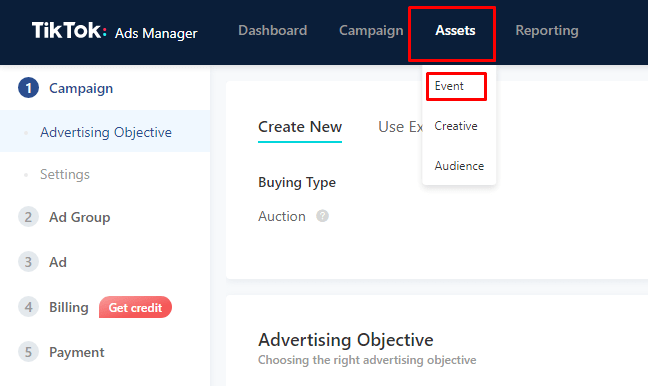
Events
Tools → Events → «Connect data source».
3
New pixel
Manual install, name, copy the ID.
4
Base code
Install it on all pages of the site.
Example ID: C9ABC123DEF456GH — add it in ClikBy.
Install
Manually / GTM
- Copy the code into <head>
- All pages or Tag Manager
- Check: Pixel Helper / test events
In ClikBy: Pixels → Add → TikTok type → ID → Save.
Scenarios
- Gen Z retargeting: bring back visitors without a purchase
- Conversions: purchases, sign-ups, subscriptions
- Auto-optimization: the algorithm looks for those likely to convert
- Analytics: behavior after the ad
События
- ViewContent
- ClickButton
- AddToCart
- InitiateCheckout
- AddPaymentInfo
- CompletePayment
- CompleteRegistration
- Subscribe
ClikBy sends ViewContent on smart links.
For algorithm training — from ~50 conversions/week; start with broad events.
Best practices
- Pixel Helper and event tests
- 7–14 days of training
- Mobile UX and speed
- Authentic content and UGC
- Cookie policy and age limits
Совет: trends, challenges, and UGC to engage a young audience.